Grow Lights
The Best Timers for Grow Lights
The rating everyone checks is the one that never binds. Here is the arithmetic, and the three specifications that decide which timer you want.
By Scooter M., enthusiast · Published
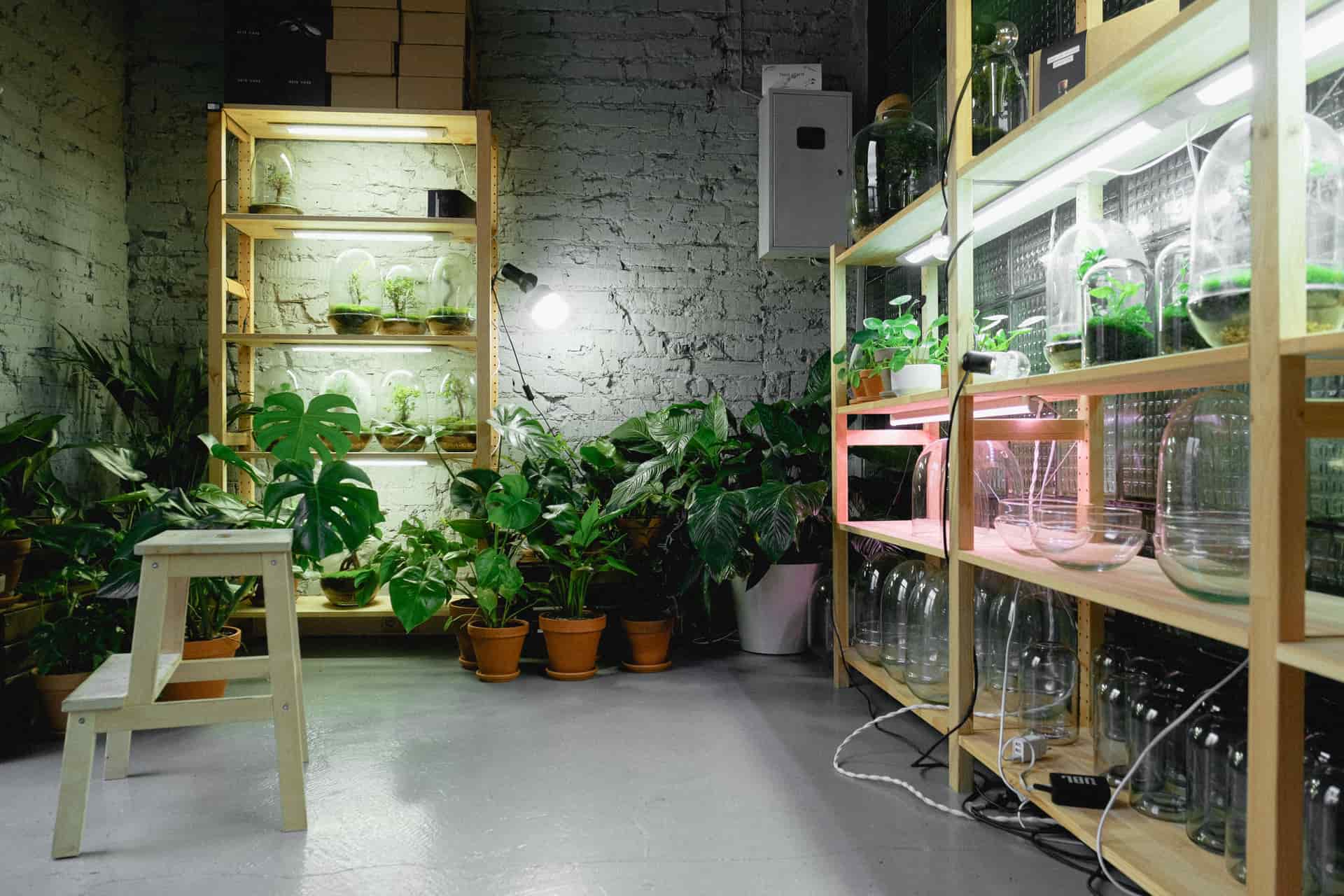
The short answer
Ignore the wattage rating. Every timer here is rated 1875 W and the largest lit shelf system on this site publishes 288 W, so you have roughly six times the headroom before you start. Choose instead on three things: how many plugs your lights actually need, whether you want 15-minute pins or minute-exact digital, and whether the schedule has to survive a power cut. If your lights are one linkable set, a grounded mechanical timer is the whole answer. If the shelf also runs a heat mat that must never switch off, get the strip with timed and always-on rows.
Disclosure Pot & Prop earns a commission when you buy through the Amazon links on this page, at no extra cost to you. It does not change which products get recommended or what we say about them, and we have not been given any of them. How this site is funded.
Almost every page in this section ends with the same sentence: put it on a timer. Plants want a consistent day length, and a light you switch on when you remember delivers an erratic one — which does more harm than a shorter, steadier schedule would. The site has been saying that for as long as the grow lights hub has existed and has never actually told you which timer to buy.
So here is that page. And it opens with the finding that makes the rest of it easy, which is that the specification everybody compares is the one that cannot possibly matter.
The wattage rating is not the decision
Timer listings lead with a big number: 1875 W, 15 A. It looks like a capacity you should size against, and for a space heater it would be. For plant lights it is not close.
timer rating / fixture wattage = fixtures per timer
1875 W / 288 W = 6.5 of the largest lit shelf system on this site. 1875 W / 40 W = 46 of the five-tier stand. 1875 W / 22 W = 85 clip lights.
Wattages quoted from the listings of fixtures already reviewed on this site. LED grow lighting for houseplants draws tens of watts, not hundreds, so the rating is headroom rather than a constraint. It would only bind on legacy high-intensity discharge lighting, which nobody is putting on a bookshelf.
That has a second, cheerful consequence. The same arithmetic that makes the rating irrelevant makes the running cost irrelevant: a 40 W fixture on for 14 hours is 0.56 kWh a day, which is cents. The timer is not there to save electricity. It is there to make the day length the same every day.
What does decide it: three specifications
1. How many plugs your lights actually need
This is the one to work out first, because it changes which product you are shopping for. Linkable bars chain together and run from one plug — the T5 bar sets on this site are sold exactly that way. Non-linkable fixtures are one plug each, and a four-tier shelf with three bars per tier is twelve plugs.
If you are at one plug, buy one single-socket timer. If you are at four or more, a timed power strip is cheaper than the timers it replaces and leaves you one dial to set rather than four to keep in sync.
2. Resolution, and how much of it you need
Mechanical timers are set by pushing pins around a dial. Fifteen-minute pins give 96 possible switch points a day; 30-minute pins give 24 cycles. Digital timers are set to the minute, but the cheap ones give you only two on/off programs for the whole day.
| Type | Resolution | Programs a day | Best at |
|---|---|---|---|
| Mechanical, 15 min pins | 15 minutes | Up to 96 | Splitting a photoperiod into blocks |
| Mechanical, 30 min pins | 30 minutes | Up to 24 | One simple on and off, cheaply |
| Digital, budget | 1 minute | 2 on/off | One exact schedule, kept exactly |
| Built into the fixture | Varies | Usually 1 cycle | Not having a separate box at all |
For a grow light this matters less than the specification sheet suggests. A photoperiod is set in hours: lights on at seven, off at nine. Whether the dial can express 7:15 or only 7:30 is not a plant question. Resolution starts mattering when you want two blocks in a day — morning and evening, with a gap while a window does the work — and only the 96-program mechanical dials do that well.
3. What happens when the power goes out
This is the specification nobody compares and the one that actually bites. A mechanical timer has no idea what time it is. It is a motor turning a dial, and when the power stops the dial stops. Come back after a three-hour outage and the timer is three hours behind — permanently, silently, until somebody notices the lights are coming on at ten.
Two or three outages a year and a mechanical timer's schedule has walked half a day out of position. A digital timer with a backup battery keeps the clock running unpowered — the one on this page publishes over 100 hours — and comes back on exactly the schedule you set. That is the entire argument for digital, and it is a good one.
The plug that does not fit
Before you buy: look at the plug on your grow light, and look at the outlet on the timer. Plenty of LED fixtures ship with a grounded three-pin plug. Plenty of budget digital timers provide a polarized two-pin outlet. They do not go together, there is no adapter you should be using, and this is the most common reason a timer arrives and goes straight back.
Three of the four timers here are grounded three-prong. The digital one is not, and that is recorded in its downsides rather than buried, because it is the single fact that decides whether it is the right purchase for you.
Quick picks
Ranked, with the published figure each pick turns on. Tap a row for the full reasoning further down this page.
| # | Product | Best for | Price |
|---|---|---|---|
| 1 | 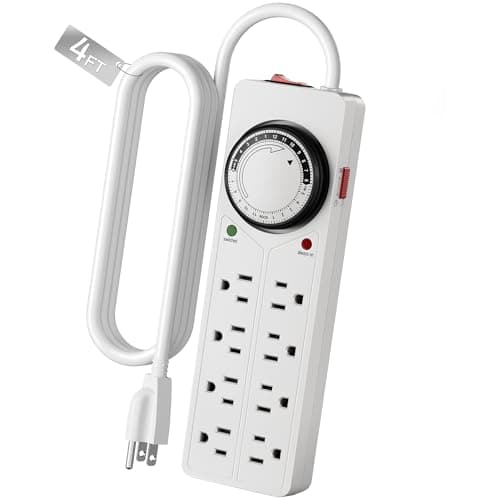 BN-LINK 8 Outlet Surge Protector with Mechanical Timer, 4 timed and 4 always-onThe only timer here that understands a plant shelf is two circuits: the lights, which must switch, and everything else, which must not. | A whole lit shelf, where the lights switch and the heat mat does not | |
| 2 | 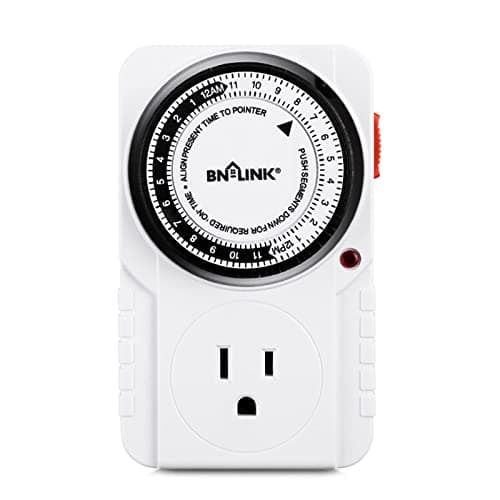 BN-LINK 24-Hour Mechanical Timer Outlet, 3-prong, 15-minute pinsThe default answer: grounded, 15-minute resolution, no pins to lose, and nothing to reprogram when the power blinks except the clock itself. | One linkable light set, set once and left alone | $7.57 at Amazon $8.99 · 16% off |
| 3 | 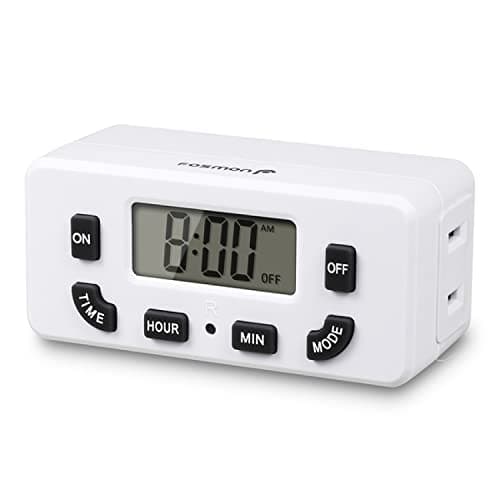 Fosmon Digital 24-Hour Timer, LCD, 2 on/off programs, battery backupSilent, exact to the minute, and the only timer here whose schedule is still correct after the power comes back — as long as your fixture has a 2-prong plug. | A schedule that has to survive a power cut unchanged | |
| 4 | 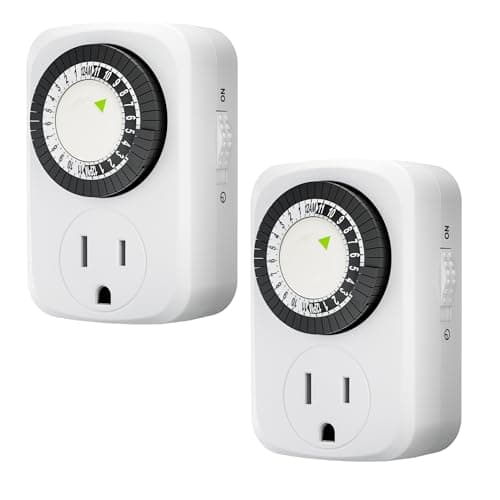 HBN Mini 24-Hour Mechanical Timer, 3-prong, 2 packTwo grounded timers for the price of one, with the trade sitting exactly where you would expect it: the dial is half as fine. | Two separate lights in two rooms, for the price of one timer | $8.51 at Amazon $9.46 · 10% off |
| 5 | 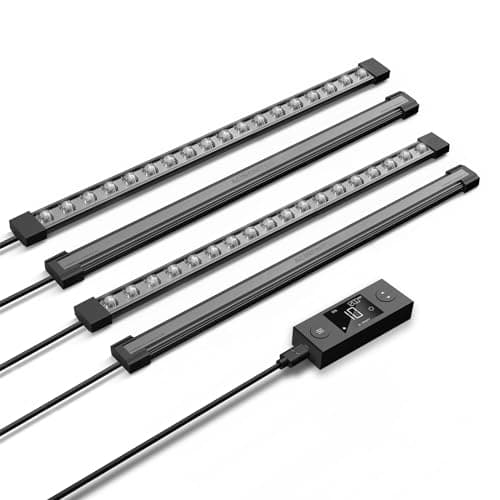 AC Infinity IONBEAM S16 Full Spectrum LED Grow Light Bar, 16 inThe only light here that publishes which diode it uses, which is the difference between a specification and an adjective. | Naming the diode instead of the marketing |
Links to Amazon are affiliate links. Prices and availability are Amazon's and change without notice.
How we ranked these
On outlets first, then on power-cut behavior, then on resolution — the order in which these actually cause problems. The eight-outlet strip leads because four timed and four always-on is the only product here that matches how a plant shelf is really wired, and because one strip replaces the four separate timers a shelf of non-linkable bars would otherwise need. The grounded mechanical timer is second and is the right answer for most single-light setups: 15-minute pins, 96 programs, built-in pins that cannot be lost, and a three-pin outlet that accepts the fixture you own. The digital timer is third on the strength of its battery backup, held there by a two-prong outlet and only two programs. The two-pack of mini mechanical timers is fourth as the value option, with an honest 30-minute dial. The AC Infinity bar is last and is not a timer at all — it is the argument for not buying one, since its controller schedules the light itself, and if you are buying the fixture anyway that is one fewer box on the shelf.
| Your setup | Timer | Why |
|---|---|---|
| Shelf with lights and a heat mat | 8-outlet strip | Timed and always-on rows, separately |
| One linkable bar set | Grounded mechanical | 15 min pins, 3-prong, nothing to lose |
| Power cuts often where you live | Digital with battery backup | Only kind whose clock survives |
| Two lights in two rooms | Mini 2-pack | Two grounded timers for one price |
| Split photoperiod, two blocks a day | Mechanical, 15 min pins | 96 programs; budget digital gives 2 |
| Still choosing the light | Fixture with a real controller | Removes the separate timer entirely |
Setting it so the plants benefit
- Pick the hours first, then the timer. Most houseplants do well on a consistent 12 to 14 hours. Decide on the window before you decide on the hardware.
- Set the dial to the actual current time before you set the schedule. A mechanical timer starts wherever the dial is pointing, which is not necessarily now.
- Give the plants a dark period. Continuous light is a stressor, not a bonus; the dark hours are part of the schedule rather than the absence of one.
- Line the schedule up with daylight rather than fighting it. Lights on in the morning and off in the evening keeps the room livable and matches what the window is already doing.
- Check it after the first power cut. On a mechanical timer, reset the dial to the correct time — the schedule inside it is still right, the clock is not.
- Keep the heat mat off it, or on the always-on row if you are using the strip.
What we deliberately do not recommend
Choosing a timer on its wattage rating, which the arithmetic above shows is headroom you will never approach. Relying on a fixture's built-in cycle timer as your only schedule, because it restarts from every interruption. Putting a heat mat or a humidifier on the same timed outlet as the lights. Buying a two-prong timer without checking the plug on your fixture. Running lights 24 hours a day on the theory that more is better. And daisy-chaining a power strip into a timer into another power strip, which is an electrical decision rather than a gardening one and not one this site is qualified to sign off.
Every pick, in full
We have not handled any of these. What follows is what each listing publishes, what that means once you put a watered pot on it, and who should buy something else.
1. A whole lit shelf, where the lights switch and the heat mat does not
BN-LINK 8 Outlet Surge Protector with Mechanical Timer, 4 timed and 4 always-on
The only timer here that understands a plant shelf is two circuits: the lights, which must switch, and everything else, which must not.
#ad · Price as of November 5, 2026. How we are funded
- What the listing publishes
- Published 4 timer-controlled outlets and 4 always-on outlets, all 8 surge protected; pin dial settable in increments as low as 15 minutes; manual override switch for the timed row; per-row indicator LEDs; circuit breaker; ETL listed to UL 1449, 1363 and 917; rated 125VAC, 15A, 1875 W
- Against a 10-inch pot
- No weight rating is published for this product, so there is nothing to check. That counts against it here rather than being treated as neutral.
Four timed and four always-on is the specification that makes this the lead pick. A working shelf has lights that need a photoperiod and a heat mat, a propagator or a small fan that should run continuously — and putting all of it on one timed outlet is how people cook or chill a tray of cuttings without realizing why.
One purchase replaces four. Non-linkable bars mean one plug each, and at that point a single timed strip costs less than the individual timers it removes, arrives with surge protection the individual timers do not have, and leaves you with one dial to set instead of four to keep in sync.
The override switch is the underrated part. It keeps the timed row on without disturbing the pin settings, which is what you want when you are repotting at nine in the evening and the lights have already gone off.
What is good
- Splits timed from always-on, which is how a plant shelf is actually wired
- 15-minute pin resolution, the finest of the mechanical timers here
- Surge protection and a circuit breaker across all eight outlets
What is not
- The listing contradicts itself on cord length, saying 4 ft in the title and 3 ft in the detail
- Mechanical, so a power cut shifts the clock and the schedule quietly drifts
- An eleven-inch strip needs somewhere to live behind the shelf
Skip it if you run one linkable light set from one plug. You are paying for seven outlets you will not use, and a single-socket timer does the identical job.
2. One linkable light set, set once and left alone
BN-LINK 24-Hour Mechanical Timer Outlet, 3-prong, 15-minute pins
The default answer: grounded, 15-minute resolution, no pins to lose, and nothing to reprogram when the power blinks except the clock itself.
- What the listing publishes
- Published 24-hour dial with built-in pins rather than removable ones, each pin 15 minutes, up to 96 on/off programs a day; grounded 3-prong; indicator light; ETL listed; rated 125VAC, 60 Hz, 1875 W, 15A
- Against a 10-inch pot
- No weight rating is published for this product, so there is nothing to check. That counts against it here rather than being treated as neutral.
Built-in pins instead of removable ones is a small design decision with a large practical effect. Loose-pin timers shed pins into the back of a drawer, and a timer missing the pin for 7:15 pm has a permanent hole in its schedule. These toggle rather than detach.
Grounded and 3-prong matters more than it sounds. Plenty of LED grow light fixtures ship with a grounded plug, and a 2-prong timer physically will not accept one — this is the single most common reason a timer arrives and cannot be used.
The 1875 W rating is enormous relative to the job. The largest lit shelf system on this site publishes 288 W, so one of these carries roughly six of them. Wattage is not what you are choosing between.
What is good
- Grounded 3-prong, so grounded fixtures actually fit
- 15-minute resolution with 96 programs a day
- Pins are built in, so there is nothing to lose
What is not
- Mechanical, so it loses the time in a power cut and drifts
- Audible click every time it switches, which carries in a quiet room
- Blocks a second socket on some duplex outlets
Skip it if the outlet is beside a bed. Mechanical timers tick continuously and click twice a day, and a digital timer is silent.
3. A schedule that has to survive a power cut unchanged
Fosmon Digital 24-Hour Timer, LCD, 2 on/off programs, battery backup
Silent, exact to the minute, and the only timer here whose schedule is still correct after the power comes back — as long as your fixture has a 2-prong plug.
#ad · Price as of November 5, 2026. How we are funded
- What the listing publishes
- Published 24-hour digital programming with 2 on/off programs and a manual MODE override; LCD display; backup battery holds settings for over 100 hours unpowered; occupies a single socket with a side-entry plug; polarized 2-prong outlet; rated 125V/15A; ETL, FCC and RoHS listed
- Against a 10-inch pot
- No weight rating is published for this product, so there is nothing to check. That counts against it here rather than being treated as neutral.
The backup battery is the actual reason to buy digital. A mechanical timer has no idea what time it is; after an outage its dial is simply behind by however long the power was out, and a photoperiod that has silently slipped two hours is the kind of fault nobody notices for weeks. This one holds its settings for over 100 hours unpowered.
Two on/off programs is genuinely limiting and worth stating plainly. It is plenty for one light on one schedule, and it cannot do what a 96-program mechanical dial can — split a photoperiod into several blocks, or stagger two runs across a day.
Read the plug specification before buying. This is a polarized 2-prong outlet, and a grow light fixture with a grounded 3-prong plug will not go into it. That single detail decides whether this timer is right for your light.
What is good
- Battery backup keeps the schedule through a power cut
- Exact to the minute rather than to the nearest pin
- Silent, and occupies only one socket of a duplex outlet
What is not
- Polarized 2-prong outlet will not accept a grounded fixture plug
- Only 2 on/off programs, against 96 on the mechanical dials
- Small buttons and a small screen make setup fiddlier than a pin dial
Skip it if your grow light has a three-pin grounded plug. It physically will not fit, and the grounded mechanical timer above is the same money.
4. Two separate lights in two rooms, for the price of one timer
HBN Mini 24-Hour Mechanical Timer, 3-prong, 2 pack
Two grounded timers for the price of one, with the trade sitting exactly where you would expect it: the dial is half as fine.
- What the listing publishes
- Published 24-hour dial at 30-minute intervals, up to 24 on/off cycles a day; grounded 3-prong; two timers per pack; ETL listed; rated 125V, 60 Hz, 15A, 1875 W resistive
- Against a 10-inch pot
- No weight rating is published for this product, so there is nothing to check. That counts against it here rather than being treated as neutral.
Thirty-minute intervals rather than fifteen is the whole compromise, and for a grow light it is close to irrelevant. A photoperiod is set in hours and the difference between lights-off at 9:00 and 9:30 does nothing to a plant. It matters if you are timing something that needs a short precise burst, which a grow light is not.
Two in a pack is the practical argument. Plant lights rarely stay in one place — one over the seedling tray, one over the shelf in the other room — and two timers at this price is less than one of most alternatives.
Grounded 3-prong, which keeps it compatible with fixtures the cheaper 2-prong digital timers reject.
What is good
- Two grounded timers in one pack
- 3-prong, so grounded grow light plugs fit
- Compact body is less likely to block the second socket
What is not
- 30-minute resolution, half as fine as the other mechanical dials
- 24 cycles a day rather than 96
- Mechanical, so it drifts after a power cut like the others
Skip it if you need one exact schedule that survives outages. Two coarse mechanical dials is the wrong shape of answer for that, and the digital timer is the right one.
5. Naming the diode instead of the marketing
AC Infinity IONBEAM S16 Full Spectrum LED Grow Light Bar, 16 in
The only light here that publishes which diode it uses, which is the difference between a specification and an adjective.
#ad · Price as of November 5, 2026. How we are funded
- What the listing publishes
- 16 in bar; published Samsung LM301H EVO diodes; digital dimming and timer controller
- Against a 10-inch pot
- No weight rating is published for this product, so there is nothing to check. That counts against it here rather than being treated as neutral.
LM301H EVO is a named, documented, third-party-testable component. Full spectrum is not. A listing that tells you the diode is a listing whose claims you can check, which is the standard this whole site is arguing for.
Digital dimming and a timer built into the controller removes the separate mechanical timer that every other light here needs.
It is a bar, not a stand. You are buying light and mounting it to something you already have.
What is good
- Publishes the actual diode, so the output claim is checkable
- Dimming and timer built into the controller
- 16 in covers a shelf properly rather than needing four short bars
What is not
- Costs several times what the generic bars here do
- No stand, so you supply the shelving
- Overspecified for a single pothos
Skip it if you are lighting one plant on a windowsill. A clip light does that for a fraction of the money, and nobody needs a documented diode for a pothos.
Questions people actually ask
Do grow lights need a timer?
What wattage timer do I need for a grow light?
Mechanical or digital timer for a grow light?
How many hours a day should a grow light be on?
Can I put a heat mat on the same timer as my grow light?
Why does my timer keep getting the schedule wrong?
Sources
- University of Illinois Extension: Houseplants — lighting
- University of Georgia Extension B1318: Growing Indoor Plants with Success
- Michigan State University Extension: Smart Gardening — growing houseplants indoors
Product specifications are quoted from each seller's own listing and are the seller's claim, not a measurement of ours.